Features
Find, capture, and win federal work
Proposal teams start from a blank page because AI is banned on CUI. Postings get found two days late. The pipeline spreadsheet breaks when a second person edits it. GovConvert addresses each problem inside your own tenant, with AI included, at one price.
What GovConvert replaces
A typical capture stack spreads the work across a generic CRM, a calendar tool, a proposal tool, and a compliance tracker. None of them read SAM.gov, FPDS, NAICS codes, or set-asides, so the team carries the integration work. Here is the module-by-module replacement.
Use AI on your proposals and pipeline without a CUI ban
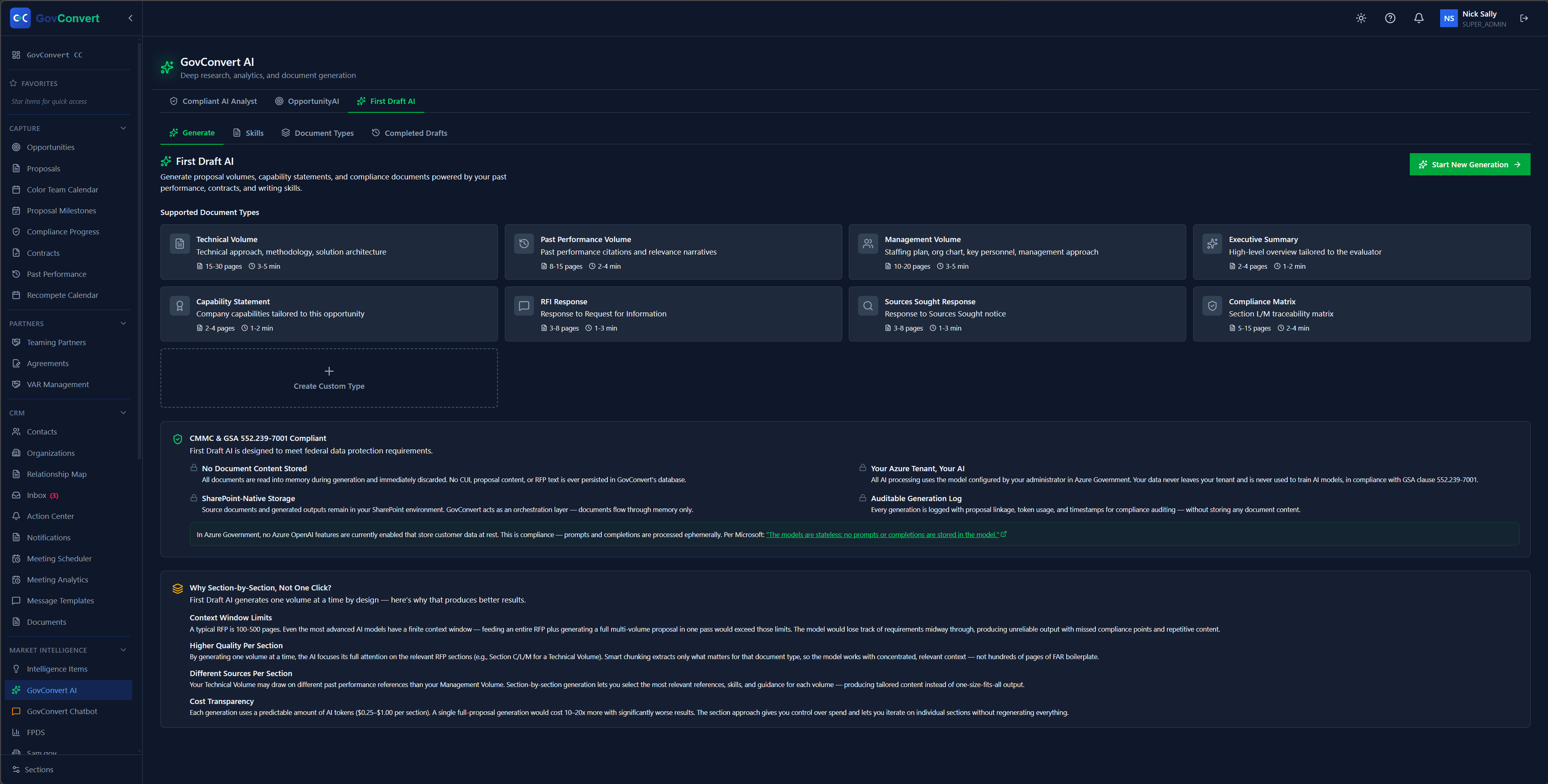
GovConvert AI answers questions across your own records and drafts from your past work, on your models, inside your tenant.
Most contractors ban public AI tools, because CUI cannot go into them. That is the correct call, and it leaves proposal teams starting every draft from a blank page.
GovConvert AI runs inside your own Azure tenant, Commercial or Government, on the models you choose. Ask it which contacts you hold at the Navy, and it answers from your own contacts, past performance, and files. Point First Draft AI at a solicitation, and it drafts the proposal sections and resumes from your templates and the work that already won.
Conversations are held in memory only and do not persist. Your data does not train a model and does not leave your tenant.
- A chatbot grounded in your own contacts, opportunities, and past performance.
- First Draft AI writes proposal sections from your volume templates: technical, management, past performance, and executive summary.
- 8 pre-built GovCon writing skills, from capability statements to compliance matrices.
- Every generation is logged to your audit trail. Bring your own AI models and build your own skills.
Stop missing postings between manual portal searches
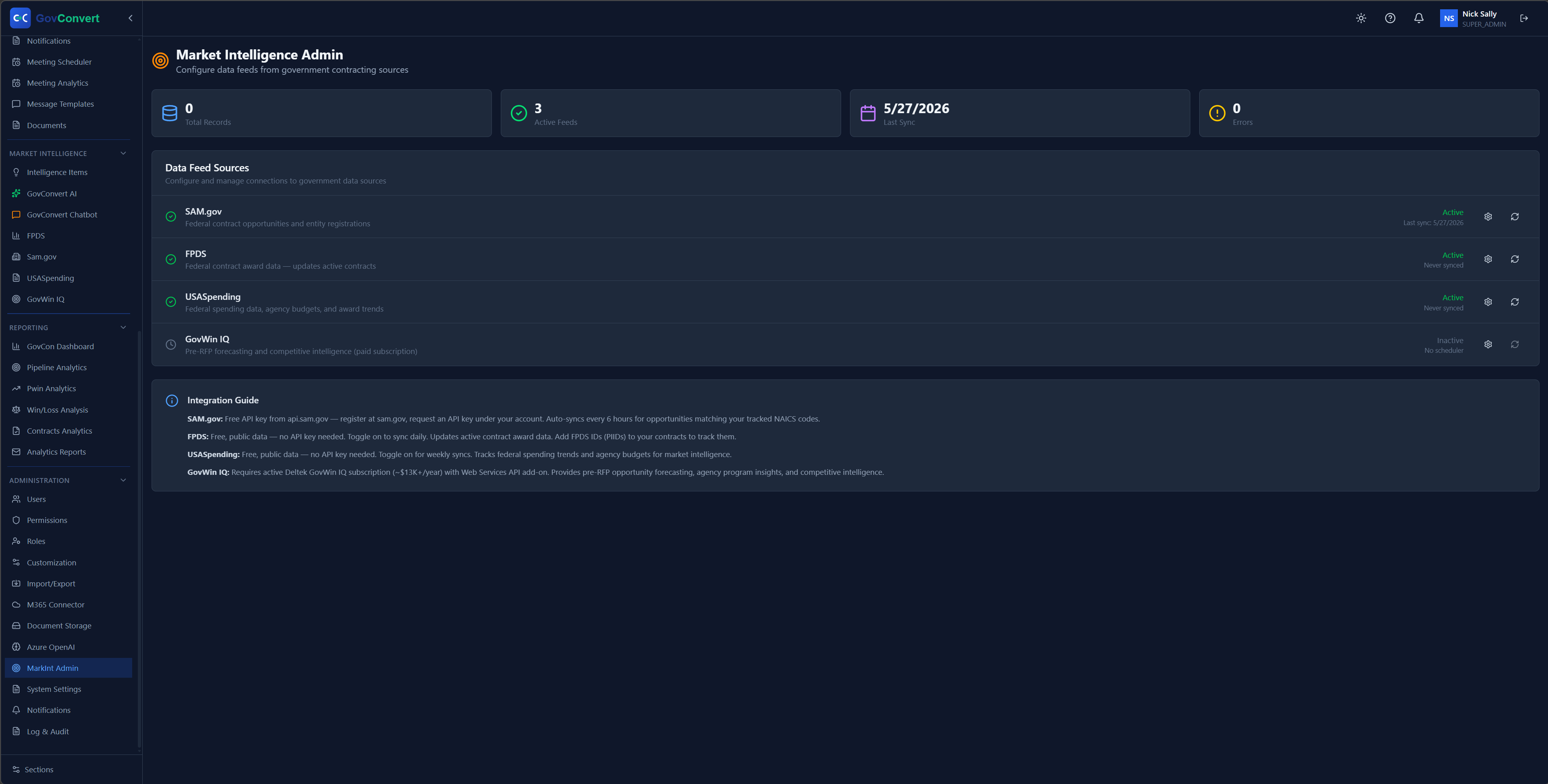
The Intelligence Feed runs every 30 minutes against your filters and emails you the matches.
A manual portal search runs once a day. The portals refresh throughout the day, so a daily routine misses response windows even on a disciplined team.
The Intelligence Feed runs the search continuously, filtered to your NAICS codes, set-asides, agencies, and dollar thresholds. New matching opportunities arrive in your inbox by email.
- Continuous search across SAM.gov, FPDS, and the GovCon news feeds you select.
- Filters tuned to your NAICS codes, set-asides, agencies, and value range.
- New matches delivered to your inbox by email alert.
- Every match lands in your pipeline ready to qualify.
Book briefings without a Calendly seat or a copied contact list
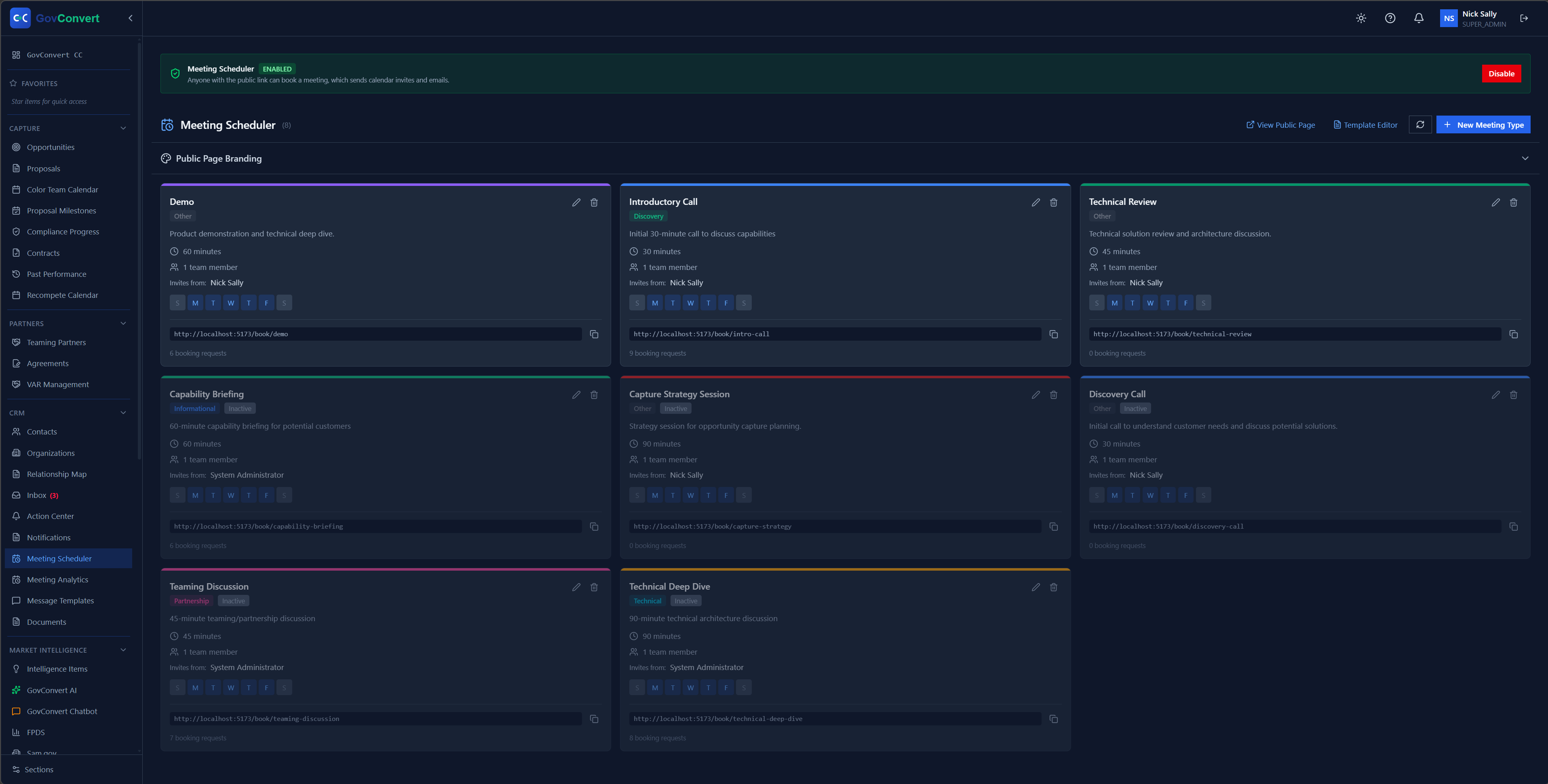
Booking pages that read M365 calendars across your team and attach each meeting to a capture record.
Calendly is an external service that reads your calendar and your contact list, and it bills a seat per person. Microsoft Bookings already runs in your tenant, but it was designed for appointment desks. It has no view of your pipeline, your opportunities, or the contacts attached to them.
GovConvert bookings is built into the product. Publish meeting types for demos, capability briefings, and teaming discussions, each with its own duration, host, and availability. It reads M365 calendars across every host on your team, and each booking attaches to the contact and the opportunity it belongs to.
- Booking pages and availability that run inside your own tenant.
- Native M365 calendar integration across multiple hosts and contacts, with real-time free/busy.
- Configure buffers, minimum notice, timezone, and which teammates count toward availability.
- Each booking attaches to the correct contact and opportunity in the capture record.
- Covers what a Calendly seat does, and adds the CRM context Microsoft Bookings does not have.
Read pipeline status on one screen, without a spreadsheet hunt
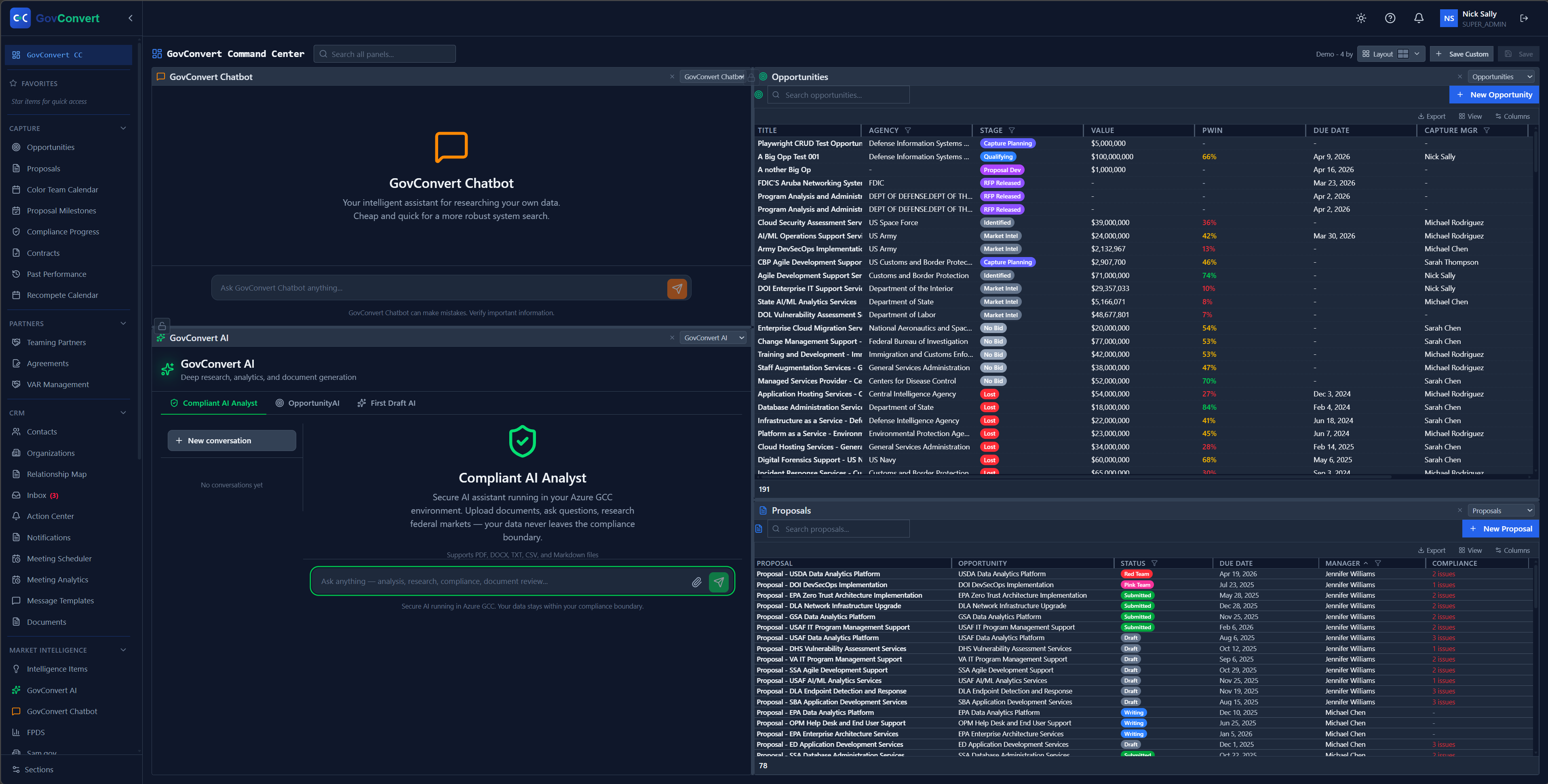
Up to 9 panels on one page, configured by your team rather than by a developer.
Current pipeline status should take one screen to read, without a spreadsheet search and follow-up messages.
Place pipeline, opportunities, the Compliant AI Analyst, and federal spending ranked by agency on the same page. Filters and sorting save by default, so a saved view persists between sessions. Fonts, margins, and cell width are configurable, on a 4K monitor or a phone.
- Up to 9 configurable panels on one page, with saved views.
- Live federal spending analytics, refreshed from USASpending.
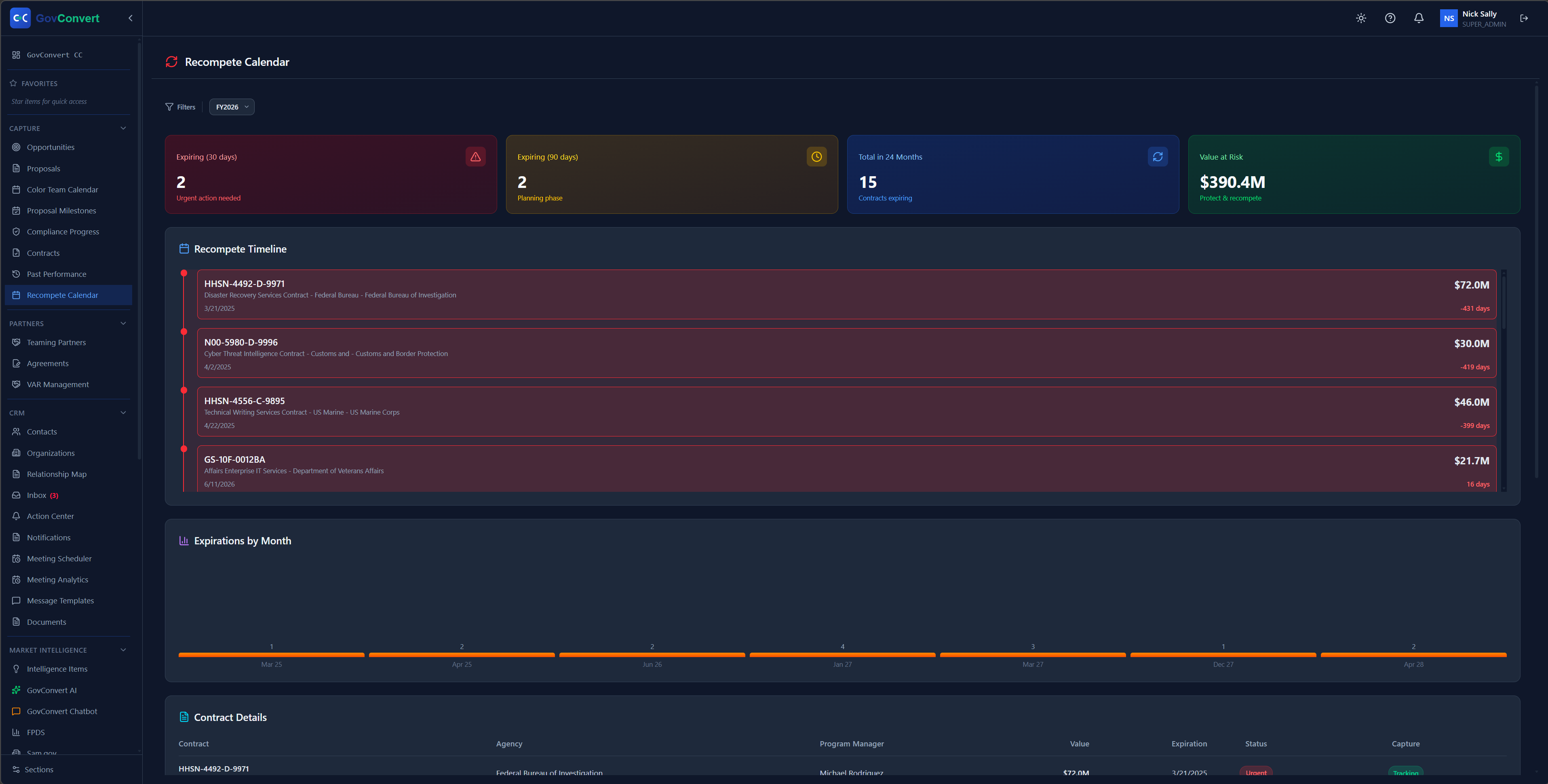
- A recompete calendar showing expiring contracts and value at risk.
- Reporting and forecasting built into the panels.
A pipeline that holds up when more than one person works in it
Built for federal work, with native support for SAM.gov, FPDS, NAICS codes, and set-asides.
A spreadsheet pipeline becomes fragile as soon as a second person works in it. A sort gets saved wrong, a column shifts, and the record stops being reliable.
GovConvert provides the full capture pipeline: opportunities, contacts, stages, probability, win themes, and gate reviews. Contact records carry the fields federal work requires, including clearance, warrant level, and acquisition certification. Each relationship is scored on access, influence, alignment, and trust.
- Pwin analytics and win/loss analysis by reason, value, and agency.
- Relationship scoring and a map of your contacts by agency.
- Color-team proposal reviews (Pink, Red, and Gold) on a shared calendar.
- CPARS past performance and teaming-partner management in the same system.
How we fit into compliance
DFARS 252.204-7012 and NIST SP 800-171 apply to your data today. Most tools in a typical stack were not designed for them. No software makes an organization compliant, and the architecture determines whether a product widens your assessment scope.
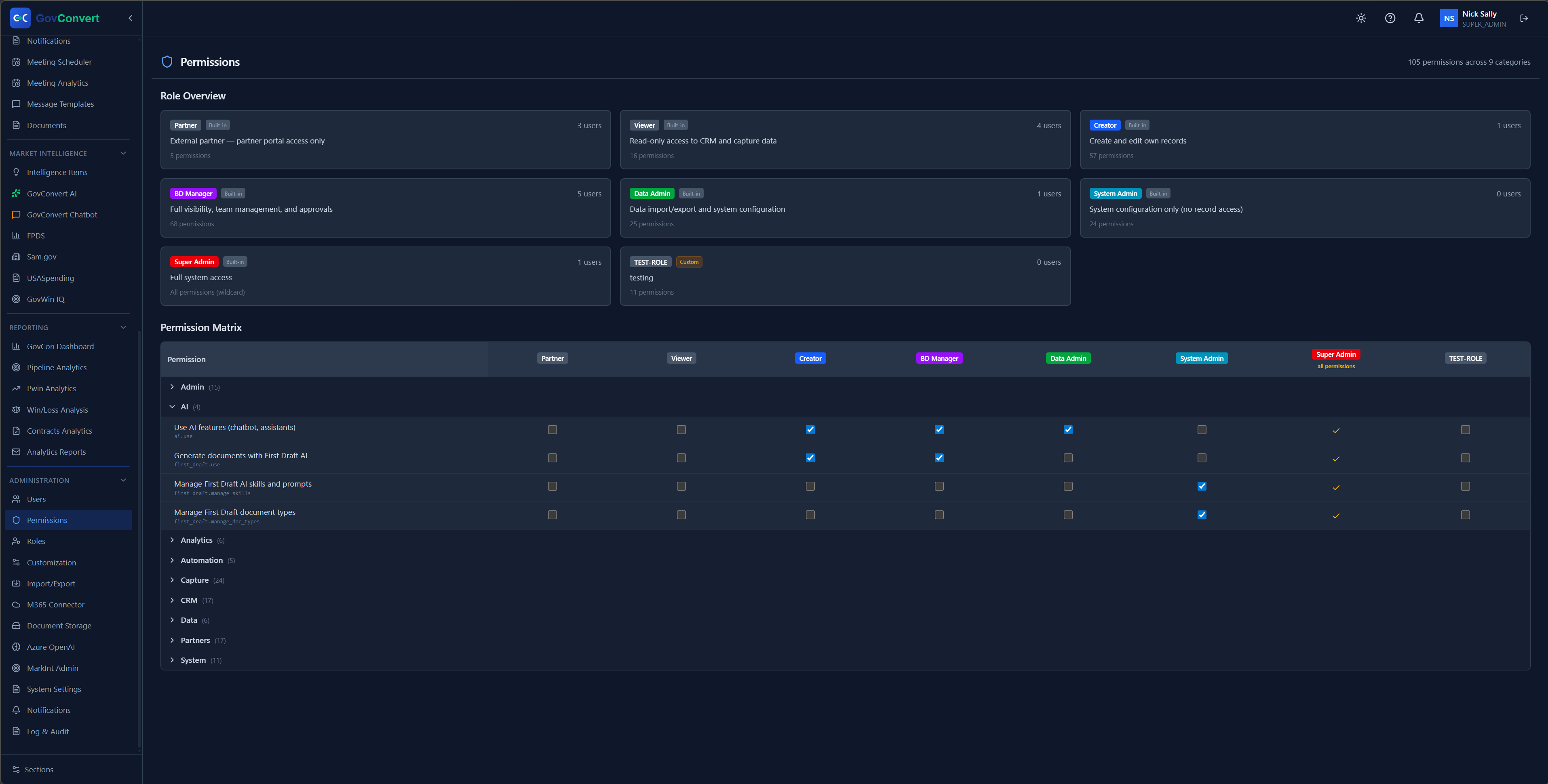
No documents are stored in the system: they stay in the SharePoint library you’ve already secured. The app deploys inside your own boundary, in Azure Commercial or Azure Government, with granular RBAC, a tamper-evident SHA-256 hash-chain audit log on by default, and forwarding straight to Microsoft Sentinel.
- No documents stored in GovConvert; they stay in your SharePoint library.
- Granular roles: 105 permissions across 9 categories, mapped role by role.
- SHA-256 hash-chain audit log, on by default, shipped to Microsoft Sentinel.
- Runs in Azure Commercial or Azure Government, alongside M365 GCC High.
Also included
These are part of the same per-seat price, with no upcharges.
Federal spending analytics
Federal contract spending ranked by agency, refreshed from USASpending.
Recompete calendar
Expiring contracts and value at risk, 30, 90, and 24 months out.
Win/loss analysis
Every bid broken down by reason, contract value, and agency.
Past performance library
CPARS-style references and citations, with coverage-gap analysis across technical areas.
Teaming partner management
Track partners and their capabilities, and assemble a team for each pursuit.
Color-team reviews
Pink, Red, and Gold proposal reviews scheduled and tracked across active proposals.
All features. One price.
Everything above is included at one price, billed monthly or annually, and you can cancel anytime. There is one plan. There are no upsells, no paywalled tiers, and no add-on modules to buy later.
Annual billing saves about 10% · Deploys into your own Azure tenant · Your own M365/Azure admin stands it up in about an hour
See GovConvert run live
Bring your NAICS codes and one live opportunity. We run the demo on them: the AI drafting from a solicitation inside the tenant, the Intelligence Feed on your filters, and a Command Center arranged for your team. GovConvert deploys into your own tenant, and you can cancel anytime.